 |
April 26, 2024 |
Sewing Classes and Events

Included in this Category:
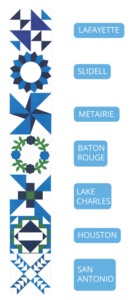
2020 Row By Row's Quilters Trek Quilting Kit starts June 21, 2020 While Supplies Last
 |
Our Price: $11.99 Prices are subject to change, and only current prices will be honored. Availability: ON BACKORDER Condition: New In Box |
Features
***Please note fabric shades and colors vary by location
Prizes List:
Prizes List(.PDF)
(Grand Prize was redeemed on 6/27/2020)
Visit any of our 7 retail stores and get your fabric kit and free store pattern to create your row.
Free Patterns for Download:
Baton Rouge Allbrands
20415 Highland Road
Baton Rouge, LA 70817-7348
(225) 923-1260
Baton Rouge Pattern(.PDF)
Slidell Allbrands
796 East I-10 Service Road,
Suite 100, Slidell, LA 70461
(985) 643-4252
Slidell Pattern(.PDF)
Houston Allbrands
18203 Egret Bay Blvd
Houston, TX 77058
(281) 333-5322
Houston Pattern(.PDF)
San Antonio Allbrands
11777 West Ave
San Antonio, TX 78216
(210) 344-0791
San Antonio Pattern(.PDF)
Metairie Allbrands
4029 Veterans Memorial Blvd
Metairie, LA 70002-5501
(504) 888-4952
Metairie Pattern(.PDF)
Lafayette Allbrands
3541 Ambassador Caffery Parkway
Lafayette, LA 70503-5130
(337) 981-2808
Lafayette Pattern(.PDF)
Lake Charles Allbrands
2615 Dillard Loop
Lake Charles, LA 70607
(337) 477-0492
Lake Charles Pattern(.PDF)
Prizes List:
Prizes List(.PDF)
(Grand Prize was redeemed on 6/27/2020)
Visit any of our 7 retail stores and get your fabric kit and free store pattern to create your row.
Free Patterns for Download:
Baton Rouge Allbrands
20415 Highland Road
Baton Rouge, LA 70817-7348
(225) 923-1260
Baton Rouge Pattern(.PDF)
Slidell Allbrands
796 East I-10 Service Road,
Suite 100, Slidell, LA 70461
(985) 643-4252
Slidell Pattern(.PDF)
Houston Allbrands
18203 Egret Bay Blvd
Houston, TX 77058
(281) 333-5322
Houston Pattern(.PDF)
San Antonio Allbrands
11777 West Ave
San Antonio, TX 78216
(210) 344-0791
San Antonio Pattern(.PDF)
Metairie Allbrands
4029 Veterans Memorial Blvd
Metairie, LA 70002-5501
(504) 888-4952
Metairie Pattern(.PDF)
Lafayette Allbrands
3541 Ambassador Caffery Parkway
Lafayette, LA 70503-5130
(337) 981-2808
Lafayette Pattern(.PDF)
Lake Charles Allbrands
2615 Dillard Loop
Lake Charles, LA 70607
(337) 477-0492
Lake Charles Pattern(.PDF)
Non-US Warranty: 30 days parts and labor.
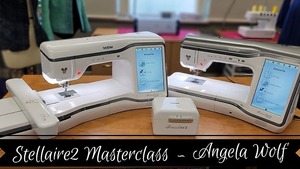
Angela Wolf SAWOLFXJ2 Digital Masterclass for Stellaire XJ2 and XE2 Machines 14 Chapters and Over 40 Video Tutorials
 Angela Wolf Digital Master Class for Stellaire XJ2 and XE2 Machines |
Our Price: $599.99 Prices are subject to change, and only current prices will be honored. Shipping: Free Ground Shipping to the Contiguous USA Availability: Usually leaves the warehouse on the same business day. Condition: New In Box |
Features
Learn how to use all the great sewing and embroidery features on your Brother Stellaire 2! Join Angela Wolf for 14 chapters filled with over 40 video tutorials featuring couching, embroidery, My Design Center, tapering stitches, and more!
Non-US Warranty: 30 days parts and labor.
Specifications
The Luminaire Master Class is an Angela Wolf product and Brother International Corporation makes no representations or warranties regarding such product.Annual/1 Year Plan
MasterClass for Brother ScanNCut SDX330D Purchases with Courtney Douthat from AllBrands AfterHours Show!
 |
Our Price: $199.00 Prices are subject to change, and only current prices will be honored. Shipping: Free Ground Shipping to the Contiguous USA Availability: Digital Download |
Features
27 Lessons,
2.5 hours of content that you can rewatch in an easy-to-use platform that you can quiz yourself.
Invitation will be emailed to you within 24 business hours after checkout.
2.5 hours of content that you can rewatch in an easy-to-use platform that you can quiz yourself.
Invitation will be emailed to you within 24 business hours after checkout.
Non-US Warranty: 30 days parts and labor.
FROM BROTHER Angela Wolf SAWOLFXJ2 Digital Masterclass for Stellaire XJ2 and XE2 Machines 14 Chapters and Over 40 Video Tutorials
Angela Wolf Digital Master Class for Stellaire XJ2 and XE2 Machines |
Shipping: Free Ground Shipping to the Contiguous USA Availability: Digital Download |
Features
Learn how to use all the great sewing and embroidery features on your Brother Stellaire 2! Join Angela Wolf for 14 chapters filled with over 40 video tutorials featuring couching, embroidery, My Design Center, tapering stitches, and more!
TO GET ACCESS TO THE CLASS*:
•You must register your eligible machine on Brother USA
•You must opt-in for emails
•Once registered you will receive an email from Brother with access to the Angela Wolf Masterclass
*Classes are free during the promotional periods when advertised for the Luminaire XP3, Airflow 3000, Stellaire XJ2 and XE2 machines. Machine-eligible owners are able to take the classes for one year from registration.
TO GET ACCESS TO THE CLASS*:
•You must register your eligible machine on Brother USA
•You must opt-in for emails
•Once registered you will receive an email from Brother with access to the Angela Wolf Masterclass
*Classes are free during the promotional periods when advertised for the Luminaire XP3, Airflow 3000, Stellaire XJ2 and XE2 machines. Machine-eligible owners are able to take the classes for one year from registration.
Non-US Warranty: 30 days parts and labor.
Specifications
The Luminaire Master Class is an Angela Wolf product and Brother International Corporation makes no representations or warranties regarding such product.Annual/1 Year Plan
SOLD OUT!! AllBrands Academy Embroidery Sewing & Quilting Event Fri-Sat August 23-24, 2024 San Antonio, TX Store
 AllBrands Academy Embroidery Sewing & Quilting Event Fri-Sat August 23-24, 2024 San Antonio, TX Store |
Our Price: $139.99 Prices are subject to change, and only current prices will be honored. |
Features
AllBrands Academy is SOLD OUT! Please fill out the wait list below

ABOUT OUR EVENT
AllBrands.com is excited to announce that we're coming to San Antonio to host our AllBrands Academy! Friday, August 23- Saturday, August 24, 9:30 AM to 5 PM with doors opening at 9 AM and closing at 6 PM both days. Come join us at the AllBrands.com for two days of hands-on embroidery sewing and quilting in our interactive workshops and lectures. We have breakout rooms that will rotate throughout the event in a round-robin style. We've assembled our best and most popular and best educators in the business to instruct you. Come meet Embroidery Experts in person for some very unique tips and tricks to help you create your one-of-a-kind masterpiece. We will also have staff and educators to help with projects and answer any questions you might have about Brother Sewing Embroidery Cutting and Quilting Machines
Don't miss this exciting opportunity to spend two days of embroidery, education, and fun. Gain valuable knowledge and experience. Leave inspired with new unique techniques, projects, memories, and most of all, make new friends. You'll learn the secrets and tips to stitch like a pro. Learn how to use embroidery and quilting to transform everyday items into money-making projects with your hobby.

University Highlights
- Each Student will take home projects
- Embroider on the newest Embroidery Machines that are provided for you
- Cut on Brother ScanNCut
- Experience Brothers' newest Technology for 2025!
- Purchase machines and supplies at deep discounts for attendees
- One Student per machine
- 2 days of embroidery, sewing quilting education friendship and fun
- Multiple Classes per day in a Rotation
- Snacks and Lunch provided
- Vendor Mall for Retail Shopping on-site
- Test Drive top of line Embroidery Machines with Staff and Experts to help
- Plenty of staff to give one one-on-one help
- Give-a-ways and prizes
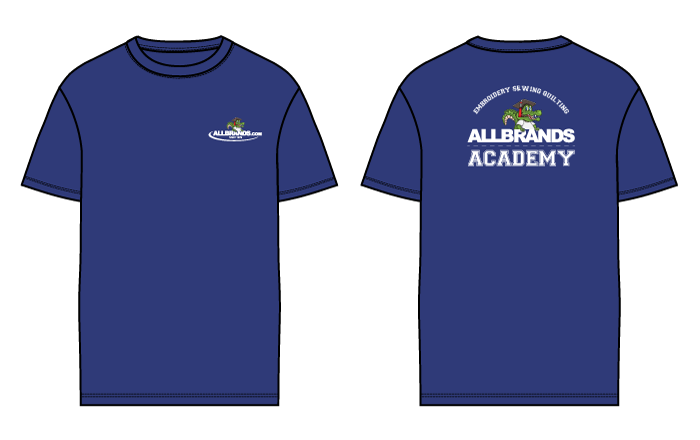
- Free Commemorative Event T-Shirt
Attendees get this Commemorative T-Shirt!


Non-US Warranty: 30 days parts and labor.
Specifications
See the Allbrands blog for more information on Allbrands Academy.AllBrands Academy Embroidery Sewing & Quilting Event Fri-Sat September 6-7, 2024 Baton Rouge, LA Store
 AllBrands Academy Embroidery Sewing & Quilting Event Fri-Sat September 6-7, 2024 Baton Rouge, LA Store |
Our Price: $139.99 Prices are subject to change, and only current prices will be honored. Availability: Advance Orders Only. Please review the product description for complete details. Condition: Seminar |
Features

ABOUT OUR EVENT
AllBrands.com is excited to announce that we're coming to Baton Rouge to host our AllBrands Academy! Friday, September 6- Saturday, September 7, 9:30 AM to 5 PM with doors opening at 9 AM and closing at 6 PM both days. Come join us at the AllBrands.com Baton Rouge Store for two days of hands-on embroidery sewing and quilting in our interactive workshops and lectures. We have breakout rooms that will rotate throughout the event in a round-robin style. We've assembled some of the best educators in the business to instruct you. Come meet Embroidery Experts in person for some very unique tips and tricks to help you create your one-of-a-kind masterpiece. We will also have staff and educators to help with projects and answer any questions you might have about Brother Sewing, Embroidery, Cutting and Quilting Machines
Don't miss this exciting opportunity to spend two days of embroidery, education, and fun. Gain valuable knowledge and experience. Leave inspired with new unique techniques, projects, memories, and most of all, make new friends. You'll learn the secrets and tips to stitch like a pro. Learn how to use embroidery and quilting to transform everyday items into money-making projects with your hobby.
University Highlights
- Each Student will take home projects
- Embroider on the newest Embroidery Machines that are provided for you
- Cut on Brother ScanNCut
- Experience Brothers' newest Technology for 2025!
- Purchase machines and supplies at deep discounts for attendees
- One Student per machine
- 2 days of embroidery, sewing quilting education friendship and fun
- Multiple Classes per day in a Rotation
- Snacks and Lunch provided
- Vendor Mall for Retail Shopping on-site
- Test Drive top of line Embroidery Machines with Staff and Experts to help
- Plenty of staff to give one one-on-one help
- Give-a-ways and prizes
- Free Commemorative Event T-Shirt
Attendees get this Commemorative T-Shirt!

Non-US Warranty: 30 days parts and labor.
Specifications
See the Allbrands blog for more information on Allbrands Academy.Kimberbell A Day At The Spa Event Saturday Rescheduled May 25th, 2024 10am - 4pm CDT - Slidell
 112890: Kimberbell A Day At The Spa Event Saturday April 6th, 2024 10am - 4pm CDT - Houston |
Our Price: $149.99 Prices are subject to change, and only current prices will be honored. Availability: Advance Orders Only. Please review the product description for complete details. |
Features
Treat yourself to a Day at the Spa! At Kimberbell’s one-day machine embroidery event, you’ll make three luxurious and giftable projects. Create a Floral Rope Bowl with creamy Project Rope and Shape Form Interfacing, then make a sweet Soap Pouch completely in-the-hoop! Our Relax Zipper Pouch features background quilting and a beautiful butterfly of dimensional Flexi Foam. With projects made in a 6×10 hoop, Day at the Spa is an embroiderer’s way to “relax, renew, and refresh.”
Great for Beginners, or avid embroiderers.
Great for Beginners, or avid embroiderers.
- Join us for one full day of embroidery fun!
- You will need to use your own Embroidery machine.
- Kits include all of the fabric and embroidery files
*If you $100 or more on Kimberbell products during the event to you will get a special Bonus CD.
Date: Saturday, April 6th, 2024
Time: 10 am - 4 pm CDT
796 East I-10 Service Road, Suite 100, Slidell, LA 70461
File Formats for included designs Include: ART, DST, EXP, HUS, JEF, PES, VIP, VP3, XXX
Non-US Warranty: 30 days parts and labor.
Specifications
Instructor: Earlean StalksKimberbell Gingerbread Christmas Event Saturday October 5, 2024 10am - 4pm CDT - Slidell
 112894: Kimberbell Gingerbread Christmas Event Saturday October 5, 2024 10am - 4pm CDT - Slidell |
Our Price: $149.99 Prices are subject to change, and only current prices will be honored. Availability: Advance Orders Only. Please review the product description for complete details. |
Features
Event Information Coming Soon!
Great for Beginners, or avid embroiderers.
Great for Beginners, or avid embroiderers.
- Join us for one full day of embroidery fun!
- You will need to use your own Embroidery machine.
- Kits include all of the fabric and embroidery files
*If you $100 or more on Kimberbell products during the event to you will get a special Bonus CD.
Date: Saturday October 5, 2024
Time: 10 am - 4 pm CDT
Location: 796 East I-10 Service Road, Suite 100, Slidell, LA 70461
File Formats for included designs Include: ART, DST, EXP, HUS, JEF, PES, VIP, VP3, XXX
Non-US Warranty: 30 days parts and labor.
Kimberbell Gingerbread Christmas Event Saturday October 5, 2024 10am - 4pm CDT - Lafayette
112894: Kimberbell Gingerbread Christmas Event Saturday October 5, 2024 10am - 4pm CDT - Slidell |
Our Price: $149.99 Prices are subject to change, and only current prices will be honored. Availability: Advance Orders Only. Please review the product description for complete details. |
Features
Event Information Coming Soon!
Great for Beginners, or avid embroiderers.
Great for Beginners, or avid embroiderers.
- Join us for one full day of embroidery fun!
- You will need to use your own Embroidery machine.
- Kits include all of the fabric and embroidery files
*If you $100 or more on Kimberbell products during the event to you will get a special Bonus CD.
Date: Saturday October 5, 2024
Time: 10 am - 4 pm CDT
Location: 3541 Ambassador Caffery Pkwy Lafayette, LA 70503-5130
File Formats for included designs Include: ART, DST, EXP, HUS, JEF, PES, VIP, VP3, XXX
Non-US Warranty: 30 days parts and labor.
Kimberbell Gingerbread Christmas Event Saturday October 5, 2024 10am - 4pm CDT - Houston
112894: Kimberbell Gingerbread Christmas Event Saturday October 5, 2024 10am - 4pm CDT - Slidell |
Our Price: $149.99 Prices are subject to change, and only current prices will be honored. Availability: Advance Orders Only. Please review the product description for complete details. |
Features
Event Information Coming Soon!
Great for Beginners, or avid embroiderers.
Great for Beginners, or avid embroiderers.
- Join us for one full day of embroidery fun!
- You will need to use your own Embroidery machine.
- Kits include all of the fabric and embroidery files
*If you $100 or more on Kimberbell products during the event to you will get a special Bonus CD.
Date: Saturday October 5, 2024
Time: 10 am - 4 pm CDT
Location: 18203 Egret Bay Blvd Houston, TX 77058
File Formats for included designs Include: ART, DST, EXP, HUS, JEF, PES, VIP, VP3, XXX
Non-US Warranty: 30 days parts and labor.
Specifications
Instructor: Margie CoxieKimberbell Gingerbread Christmas Event Saturday October 5, 2024 10am - 4pm CDT - Bossier City
112894: Kimberbell Gingerbread Christmas Event Saturday October 5, 2024 10am - 4pm CDT - Slidell |
Our Price: $149.99 Prices are subject to change, and only current prices will be honored. Availability: Advance Orders Only. Please review the product description for complete details. |
Features
Event Information Coming Soon!
Great for Beginners, or avid embroiderers.
Great for Beginners, or avid embroiderers.
- Join us for one full day of embroidery fun!
- You will need to use your own Embroidery machine.
- Kits include all of the fabric and embroidery files
*If you $100 or more on Kimberbell products during the event to you will get a special Bonus CD.
Date: Saturday October 5, 2024
Time: 10 am - 4 pm CDT
Location: 1701 Old Minden Rd # 11, Bossier City, LA 71111
File Formats for included designs Include: ART, DST, EXP, HUS, JEF, PES, VIP, VP3, XXX
Non-US Warranty: 30 days parts and labor.
Specifications
Instructor: Stacy ShumateKimberbell A Day At The Spa Event Saturday May 4th, 2024 10am - 4pm CDT - San Antonio, TX
112890: Kimberbell A Day At The Spa Event Saturday April 6th, 2024 10am - 4pm CDT - Houston |
Our Price: $149.99 Prices are subject to change, and only current prices will be honored. Availability: Advance Orders Only. Please review the product description for complete details. |
Features
Treat yourself to a Day at the Spa! At Kimberbell’s one-day machine embroidery event, you’ll make three luxurious and giftable projects. Create a Floral Rope Bowl with creamy Project Rope and Shape Form Interfacing, then make a sweet Soap Pouch completely in-the-hoop! Our Relax Zipper Pouch features background quilting and a beautiful butterfly of dimensional Flexi Foam. With projects made in a 6×10 hoop, Day at the Spa is an embroiderer’s way to “relax, renew, and refresh.”
Great for Beginners, or avid embroiderers.
Great for Beginners, or avid embroiderers.
- Join us for one full day of embroidery fun!
- You will need to use your own Embroidery machine.
- Kits include all of the fabric and embroidery files
*If you $100 or more on Kimberbell products during the event to you will get a special Bonus CD.
Date: Saturday, May 4th, 2024
Time: 10 am - 4 pm CDT
11777 West Ave San Antonio, TX 78216
File Formats for included designs Include: ART, DST, EXP, HUS, JEF, PES, VIP, VP3, XXX
Non-US Warranty: 30 days parts and labor.
Specifications
Educator - Mitzie KaterndahlKimberbell A Day At The Spa Event Saturday, April 27th 2024 10am - 4pm CDT - Bossier
112890: Kimberbell A Day At The Spa Event Saturday April 6th, 2024 10am - 4pm CDT - Houston |
Our Price: $149.99 Prices are subject to change, and only current prices will be honored. Availability: Advance Orders Only. Please review the product description for complete details. |
Features
Treat yourself to a Day at the Spa! At Kimberbell’s one-day machine embroidery event, you’ll make three luxurious and giftable projects. Create a Floral Rope Bowl with creamy Project Rope and Shape Form Interfacing, then make a sweet Soap Pouch completely in-the-hoop! Our Relax Zipper Pouch features background quilting and a beautiful butterfly of dimensional Flexi Foam. With projects made in a 6×10 hoop, Day at the Spa is an embroiderer’s way to “relax, renew, and refresh.”
Great for Beginners, or avid embroiderers.
Great for Beginners, or avid embroiderers.
- Join us for one full day of embroidery fun!
- You will need to use your own Embroidery machine.
- Kits include all of the fabric, and embroidery files
*If you $100 or more on Kimberbell products during the event to you will get a special Bonus CD.
Date: Saturday, April 27th 2024 10am - 4pm
Time: 10 am - 4 pm CDT
Location: 1701 Old Minden Rd # 11, Bossier City, LA 71111
File Formats for included designs Include: ART, DST, EXP, HUS, JEF, PES, VIP, VP3, XXX
Non-US Warranty: 30 days parts and labor.
Specifications
Instructor: Stacey Shumate
Copyright © 1995-2024 AllBrands.com.
SewingMachineStore and SewingMachineStore.com are property and trademarks of AllBrands, LLC, dba AllBrands.com. All Rights Reserved.
SewingMachineStore and SewingMachineStore.com are property and trademarks of AllBrands, LLC, dba AllBrands.com. All Rights Reserved.