Get the tools that are right for your digitizing software needs with 4 levels of features. All levels feature new Version 12 enhancements including new UI with a customizable interface, cloud-based security, updated design tools, 4K support, and much more.
The Melco 35497-01 DS12 Design Shop Editor Digitizing Software is a powerful PC-based program used to create, modify, and manage digital embroidery files. It provides a suite of tools that let you customize fonts, edit stitch paths, and convert artwork into readable instructions for embroidery machines
Key Features Customizable Workspace: Offers adjustable toolbars, tabs, and a modern, user-friendly interface.Cloud Security: Keeps your software safe with user account management controls.Lettering: Includes 200+ digitized fonts and monograms, plus easy preset shapes for text.Digitizing & Editing: Allows manual editing, auto-underlay, wireframe or stitch editing, and batch conversion.File Compatibility: Supports standard formats and allows exporting high-resolution PNGs.Software LevelsMelco's DesignShop 12 is available in different tiers depending on your needs. The Editor level is ideal for users who need to alter existing designs, adjust lettering, and resize files without needing high-level vector or automated digitizing tools.Other available levels of this software include:Lite: Basic lettering and sizing tools.Vector: Includes graphic conversion assistants and vector graphic support.Professional: Offers advanced digitizing tools like distortion effects, auto-border, and shadow tools.Who Should Use It?This software is primarily utilized by commercial embroiderers, custom apparel creators, and businesses that need precise control over their embroidery designs and production flow.If you would like to explore purchasing options or compare software features, you can check out the official Melco DesignShop 12 site, view the feature chart on the DesignShop 12 Compare page, or see retail listings on AllBrands.If you'd like, let me know:Your experience level with digitizingWhat type of embroidery projects you work on mostIf you need help comparing the Editor tier with the Professional tierI can help you pick the exact le
The Melco 35497-01 DS12 Design Shop Editor Digitizing Software is a powerful PC-based program used to create, modify, and manage digital embroidery files. It provides a suite of tools that let you customize fonts, edit stitch paths, and convert artwork into readable instructions for embroidery machines
Key Features Customizable Workspace: Offers adjustable toolbars, tabs, and a modern, user-friendly interface.Cloud Security: Keeps your software safe with user account management controls.Lettering: Includes 200+ digitized fonts and monograms, plus easy preset shapes for text.Digitizing & Editing: Allows manual editing, auto-underlay, wireframe or stitch editing, and batch conversion.File Compatibility: Supports standard formats and allows exporting high-resolution PNGs.Software LevelsMelco's DesignShop 12 is available in different tiers depending on your needs. The Editor level is ideal for users who need to alter existing designs, adjust lettering, and resize files without needing high-level vector or automated digitizing tools.Other available levels of this software include:Lite: Basic lettering and sizing tools.Vector: Includes graphic conversion assistants and vector graphic support.Professional: Offers advanced digitizing tools like distortion effects, auto-border, and shadow tools.Who Should Use It?This software is primarily utilized by commercial embroiderers, custom apparel creators, and businesses that need precise control over their embroidery designs and production flow.If you would like to explore purchasing options or compare software features, you can check out the official Melco DesignShop 12 site, view the feature chart on the DesignShop 12 Compare page, or see retail listings on AllBrands.If you'd like, let me know:Your experience level with digitizingWhat type of embroidery projects you work on mostIf you need help comparing the Editor tier with the Professional tierI can help you pick the exact le
Specifications
Lettering:
NEW! Customizable Theme with Space-Saving Features
NEW! Cloud-Based Security with User Account Management Control
NEW! Support for EXP+ Filetype
NEW! Easy-to-Select Preset Shapes for Envelope Text
NEW! Check for Updates with User Notifications
NEW! Custom Line Type
All 200+ Fonts and Monograms (30+ new digitized fonts!)
1000 Stock Embroidery Designs
Auto Underlay and Density
Trim Between Letters, Words, or Only When Specified
TrueType and OpenType Font Support
Realistic 3D Rendering of Embroidery
Custom Shapes and Designs Library
Design Checker
Editor:
NEW! Export High-Resolution PNG files
NEW! Updated Pattern Fill Generation
NEW! Create New Custom Shapes Folders
NEW! New Gradient Letter Characters
Manual Digitizing
Multiple Stitch Directions Within an Element
Selectable Character List for Fonts
Automatic Fabric Adjustment via Styles
Alignment Tools
Batch Conversion
Wireframe or Stitch Editing
NEW! Customizable Theme with Space-Saving Features
NEW! Cloud-Based Security with User Account Management Control
NEW! Support for EXP+ Filetype
NEW! Easy-to-Select Preset Shapes for Envelope Text
NEW! Check for Updates with User Notifications
NEW! Custom Line Type
All 200+ Fonts and Monograms (30+ new digitized fonts!)
1000 Stock Embroidery Designs
Auto Underlay and Density
Trim Between Letters, Words, or Only When Specified
TrueType and OpenType Font Support
Realistic 3D Rendering of Embroidery
Custom Shapes and Designs Library
Design Checker
Editor:
NEW! Export High-Resolution PNG files
NEW! Updated Pattern Fill Generation
NEW! Create New Custom Shapes Folders
NEW! New Gradient Letter Characters
Manual Digitizing
Multiple Stitch Directions Within an Element
Selectable Character List for Fonts
Automatic Fabric Adjustment via Styles
Alignment Tools
Batch Conversion
Wireframe or Stitch Editing
Other Images
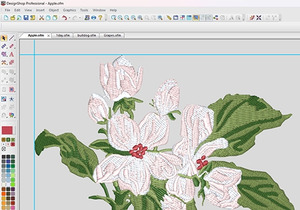 Customize Your Workspace
Configure your workspace the way you like it with improved UI customization and a fresh new interface.
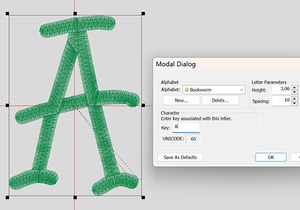 Enhanced Lettering Tools
Get more control over lettering elements with enhanced arched text, typing on paths, and an easy-to-use text-box editor.
 Cloud-Based Licensing
This game-changing upgrade for our software allows for more flexibility and a smoother experience for every customer.