Brother Needle Calibration Stickers
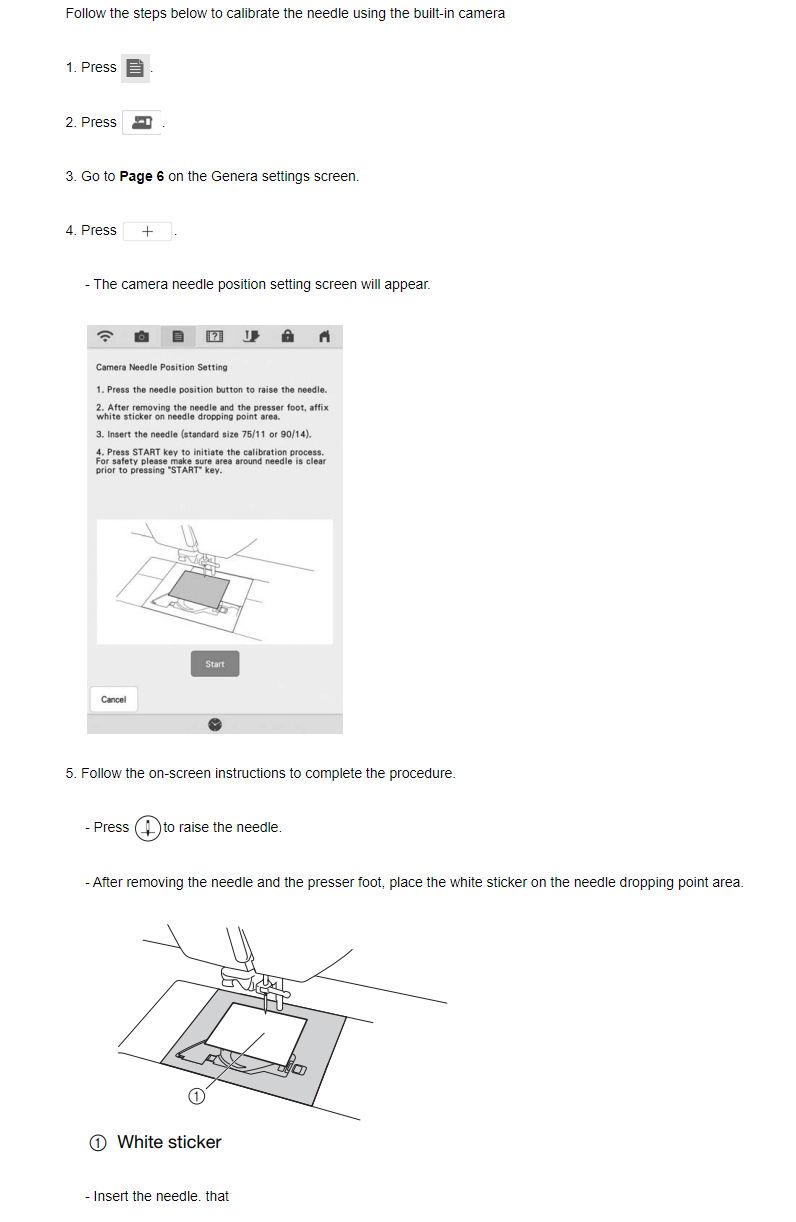
[BrotherSupportSewing] Calibrating the camera needle position
[BrotherSupportSewing] Calibrating the camera needle position
Specifications
Videos on Brother XE7916001 Needle Calibration Stickers PR100
Compatible Machines
• Brother XV8500D (XV85), XV8550
• Brother BP3600
• Brother Luminaire (XP1, XP2, XP3 / XP Luminaire)
• Select Baby Lock sewing and embroidery machines
How to Use the Calibration Stickers
Raise the Needle: Press the needle position button to raise the needle, then remove the needle and presser foot
Apply the Sticker: Affix a fresh, clean white calibration sticker directly onto the needle dropping point area. Make sure the sticker is flat and has no holes or dirt.
Insert a standard size needle (75/11 or 90/14) and push it all the way up.
1. Run Calibration:
• Navigate to the machine's General Settings (page 6) and select the Camera needle position setting.
• Press the start/calibration key while keeping the area clear.
• The machine will make a small mark on the sticker and align the sensor.
• Press OK to save/memorize the data, or press Retry (or affix a new sticker) if an "NG" (No Good) error appears.
2. Finish: Remove the used sticker once calibration finishes.
If you'd like, let me know:
Compatible Machines
• Brother XV8500D (XV85), XV8550
• Brother BP3600
• Brother Luminaire (XP1, XP2, XP3 / XP Luminaire)
• Select Baby Lock sewing and embroidery machines
How to Use the Calibration Stickers
Raise the Needle: Press the needle position button to raise the needle, then remove the needle and presser foot
Apply the Sticker: Affix a fresh, clean white calibration sticker directly onto the needle dropping point area. Make sure the sticker is flat and has no holes or dirt.
Insert a standard size needle (75/11 or 90/14) and push it all the way up.
1. Run Calibration:
• Navigate to the machine's General Settings (page 6) and select the Camera needle position setting.
• Press the start/calibration key while keeping the area clear.
• The machine will make a small mark on the sticker and align the sensor.
• Press OK to save/memorize the data, or press Retry (or affix a new sticker) if an "NG" (No Good) error appears.
2. Finish: Remove the used sticker once calibration finishes.
If you'd like, let me know:
How do I calibrate the setting of the camera needle position?
Setting the camera needle position is essential when you use camera or projector function. It is not necessary to perform this operation each time, but we recommend performing it when the needle is changed. Use the white stickers (solid) included with the machine.
image
Press image .
>> The settings screen appears.
Press image .
>> The General settings screen appears.
Display page 6 of the General settings screen.
Press image .
image
>> Camera needle position setting screen appears.
Follow the on-screen instructions to complete the procedure.
1. Press the needle position button to raise the needle.
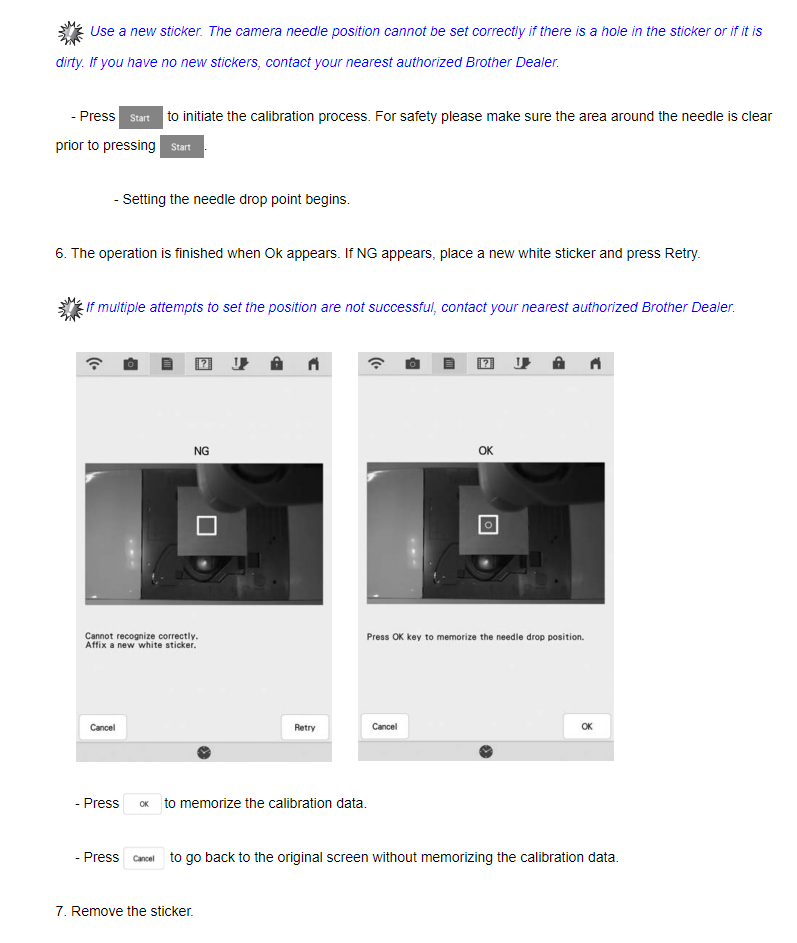
2. After removing the needle and the presser foot, affix white sticker on needle dropping point area.
image (1) White sticker
3. Insert the needle (standard size 75/11 or 90/14).
Use a new sticker. The camera needle position cannot be set correctly if there is a hole in sticker or if it is dirty. If you have no new stickers, contact your nearest authorized Brother dealer.
4. Press image to initiate the calibration process.
For safety please make sure area around needle is clear prior to pressing image .
>> Setting the needle drop point begins.
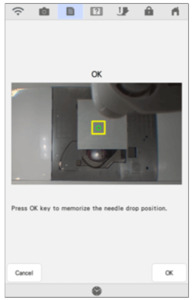
The operation is finished when OK appears. If NG appears, affix a new white sticker, and then press . If multiple attempts to set the position are not successful, contact your nearest authorized Brother dealer.
OK NG
image image
* Press OK to memorize the calibration data.
* Press image to back to original screen without memorizing the calibration data.
Setting the camera needle position is essential when you use camera or projector function. It is not necessary to perform this operation each time, but we recommend performing it when the needle is changed. Use the white stickers (solid) included with the machine.
image
Press image .
>> The settings screen appears.
Press image .
>> The General settings screen appears.
Display page 6 of the General settings screen.
Press image .
image
>> Camera needle position setting screen appears.
Follow the on-screen instructions to complete the procedure.
1. Press the needle position button to raise the needle.
2. After removing the needle and the presser foot, affix white sticker on needle dropping point area.
image (1) White sticker
3. Insert the needle (standard size 75/11 or 90/14).
Use a new sticker. The camera needle position cannot be set correctly if there is a hole in sticker or if it is dirty. If you have no new stickers, contact your nearest authorized Brother dealer.
4. Press image to initiate the calibration process.
For safety please make sure area around needle is clear prior to pressing image .
>> Setting the needle drop point begins.
The operation is finished when OK appears. If NG appears, affix a new white sticker, and then press . If multiple attempts to set the position are not successful, contact your nearest authorized Brother dealer.
OK NG
image image
* Press OK to memorize the calibration data.
* Press image to back to original screen without memorizing the calibration data.
Recommended Accessories