

Unlock your creativity in Embroidery Tool Shed Plus software! A complete machine embroidery workshop awaits you, packed with easy-to-use tools to customize your embroidery designs. From fundamental editing like merging, resizing, and aligning to fancy lettering features, like the monogram tool, you'll find everything you need to control colors, spacing, size, and more.
This software is a download - you can access it through the My Software section of your OESD account after purchasing.
Minimum System Requirements:
PC
Windows 11
Processor: 1 gigahertz (GHz) or faster with 2+ cores or System on a Chip (SoC)
RAM: 4 GB (64-bit)
Free hard disk space: 64 GB
Graphics card: DirectX 12-compatible with WDDM 2.0 driver
Mac
MacOS¨ version 14.x.x (Sonoma)
Processor: 8th-generation Intel Amber Lake/Coffee Lake or Intel Xeon-W, or Apple M1/M2/M3/M4 chip
Memory: 8 GB
Free hard disk space: 25 GB
Once purchased, software is non-refundable.
Formats Supported:
C2S, C2F, CSD, DAT, DST, DSB, DSZ, EMD, EXP, HUS, JEF, JHS, KSM, LDF, M3, PCM, PCS, PEC, PES v1-2, PES v4-9, PHC, SEW, SHV, SST, TAP, T01, T03, T05, U01, U02, VIP, VP3, VP4, XXX, ZSK, 10o
OESD Embroidery Tool Shed PLUS
Unlock your creativity with a complete collection of powerful embroidery tools! Embroidery Tool Shed PLUS gives you the freedom to customize, edit, personalize, and enhance embroidery designs with professional features that make creating beautiful projects easier than ever.
Lettering & Monogramming Features
Personalize your embroidery projects with versatile lettering and monogramming tools. Easily add text, customize its appearance, and create beautiful lettering arrangements.
- Built-in Monogram Tool
- 17 different embroidery fonts included
- Place and edit text within embroidery designs
- Resize text quickly and easily
- Adjust line spacing
- Create circular text
- Arc text with one click
- Pre-set envelope shapes for creative text arrangements
Design Features
Take control of your embroidery designs with tools that simplify preparation and improve stitching results.
- Auto Baste functionality
- Merge multiple embroidery designs
- Design Analyzer
- Junk Stitch Filter
- Save designs in all popular embroidery file formats
Design Editing Features
Customize every detail of your embroidery projects with powerful editing tools. Adjust colors, resize designs, organize elements, and fine-tune placement to achieve your desired results.
- Recolor embroidery designs
- Convert thread colors between different thread brands
- Alignment tools for vertical, horizontal, and center alignment
- Resize designs with automatic stitch regeneration
- Copy, paste, and merge design elements
- Group and ungroup design elements
- Rotate and mirror designs
- Color sort for improved stitching efficiency
Design Viewing & Preview Features
Preview and prepare your embroidery projects with helpful visualization and layout tools.
- Print full-size design templates
- Stitch Sequence Simulator
- Zoom and pan with realistic viewing options
- Gridlines and guidelines
- View and create embroidery hoops
More Creative Possibilities
Advanced Text Editing
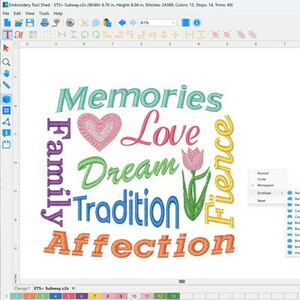
Place and edit text directly in your designs. Use envelope shapes, circular lettering, adjustable line spacing, and text resizing to create customized embroidery projects.
Resize & Recalculate Stitches
Resize embroidery designs with a simple click and drag. Stitches are automatically recalculated, adding or removing stitches as needed to accommodate the new design dimensions.
Print Full-Size Templates
Print full-size embroidery design templates to help determine exactly where your design should be positioned before stitching.
Arc Text & Circular Lettering
Easily curve lettering around circles, ovals, and oblong shapes. Take control of the text curve to create distinctive embroidery layouts.
Professional Monogramming
Create personalized monograms with the built-in Monogram Tool and its three included monogram fonts.
Merge & Recolor Designs
Combine and recolor embroidery designs, group or ungroup elements, and use convenient alignment tools to achieve the perfect finished design.
17 Embroidery Fonts Included
Enjoy 17 included fonts: 5 script, 4 serif, 3 sans serif, 3 monogram, 1 puffy, and 1 appliqué font.
3D Foam Embroidery
Add texture and dimension to your embroidery with a specially digitized font designed for 3D foam embroidery.
Windows & Mac Compatibility
Embroidery Tool Shed PLUS runs natively on both Windows and Mac computers.
Wirelessly send embroidery designs to compatible Baby Lock and Brother embroidery machines equipped with wireless connectivity.
Embroidery Tool Shed PLUS – Powerful Tools. Endless Creativity.
 Print Templates
Print full-size design templates so you know exactly where to stitch your design.
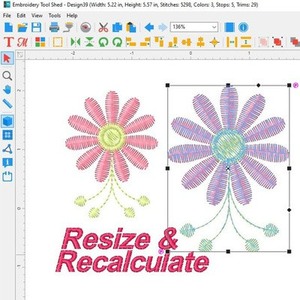 Resize and recalculate stitches
Click and drag to resize designs - stitches automatically recalculate and are added or removed as needed.
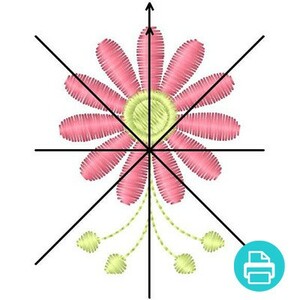 Print Templates
Print full-size design templates so you know exactly where to stitch your design.
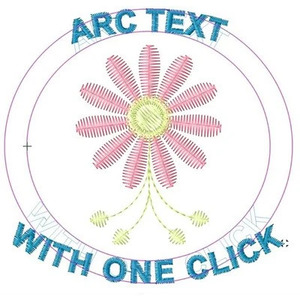 Arc Text
Easily arc text on a circle and control the curve of the text. Circle, oval, oblong - you're in charge!
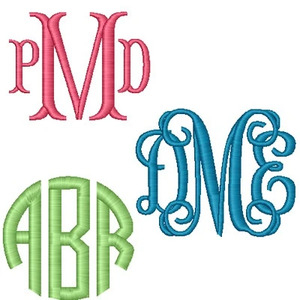 Monogram Tool
Create professional monograms using the built-in Monogram Tool, includes 3 fonts
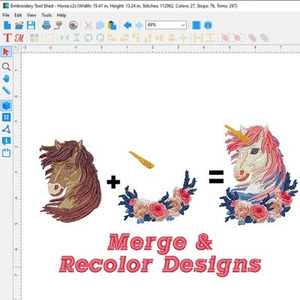 Merge & Recolor Designs
Powerful editing features at your fingertips! Merge and recolor embroidery designs, group/ungroup, and easy-to-use alignment tools allow you to fully control the final look of your project.
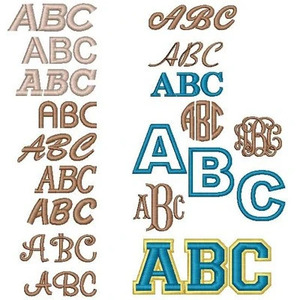 17 Fonts Included
You get (5) script, (4) serif, (3) sans serif, (3) monogram, (1) puffy, (1) applique font
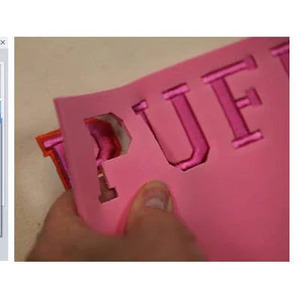 Embroider with 3D Foam!
Add texture and dimension with 1 specially digitized font for foam

Recommended Accessories



Other Items You May Be Interested In
-

DIME Inspirations Embroidery Tool Shed Plus Embroidery Software Brother/Baby Lock Machines - Digital Delivery
$159.99 -
DIME Inspirations Thread Color Converter Pro Software Trial Download, Conversion to from 14 Brands of Embroidery Thread
-

DIME CD00100 Embroider It Yourself Scrumptious Sweats CD Video
$39.99 -
DIME Designs in Machine Embroidery 1 Step Quilting & Applique Stipple! Autumn Leaves - Download
$29.99 -
DIME STP0111 Designs in Machine Embroidery Stipple Jingle Bells CD
$29.99
